react-native-reanimated and react-native-worklets
Two package names resolve into this same corner of the platform.
react-native-reanimated aliases to react-native-gtkx/reanimated, and
react-native-worklets aliases to react-native-gtkx/worklets. An app
imports either package under its ordinary name — no source change — and gets
Reanimated 4's semantics running on a platform with a single thread.
import Animated, {
  useAnimatedStyle,
  useSharedValue,
  withTiming,
} from "react-native-reanimated"
One thread, not two
On mobile, Reanimated exists to cross a thread boundary: JS and the UI run on
separate runtimes, and worklets, shared values, runOnUI and the Babel
plugin all exist to move work across it. Here GTK's main loop is the JS
thread — a widget call is a synchronous C call on the same stack — so a
worklet is an ordinary function, measure() is synchronous, and a shared
value is an observable box that updates in place.
This is upstream's own behavior, not a platform-specific reinterpretation:
react-native-reanimated selects this same flattened implementation for
react-native-windows and for the web. Its non-DOM, non-native-runtime web
build is the blueprint this subpath is read off, including its pure-JS
pieces (interpolate, Easing, the spring solver's config normalization),
which are ported here rather than imported.
The Babel plugin is neither required nor assumed. Its output is an ordinary
lexical closure carrying metadata properties and no injected runtime import,
so 'worklet' is an inert directive — a worklet is directly callable whether
or not the plugin has run. This platform never runs Babel itself (the vite
path bundles with rolldown; the Metro path uses the app's own stock preset),
so an app that also ships to iOS or Android keeps the plugin for those
builds without conflict.
Differs from react-native-reanimated: worklet closures use live lexical
capture, not the Babel plugin's by-value snapshot. This is only observable
for a worklet that closes over a reassigned plain let — already a bug on
mobile — so ordinary code is unaffected.
Dependency tracking in useDerivedValue and useAnimatedReaction is dynamic
rather than static: a mapper subscribes to the shared values it actually
reads on each run, rather than to a Babel-collected __closure list. A
dependencies array is accepted and honored — it still controls when a
mapper rebuilds — but it is never required for correctness, and a
conditional read is tracked correctly either way.
makeShareableCloneRecursive and isWorkletFunction are re-exported
directly from the worklets subpath described at the end of this page — the
same instance, not a second implementation.
Shared values and animations
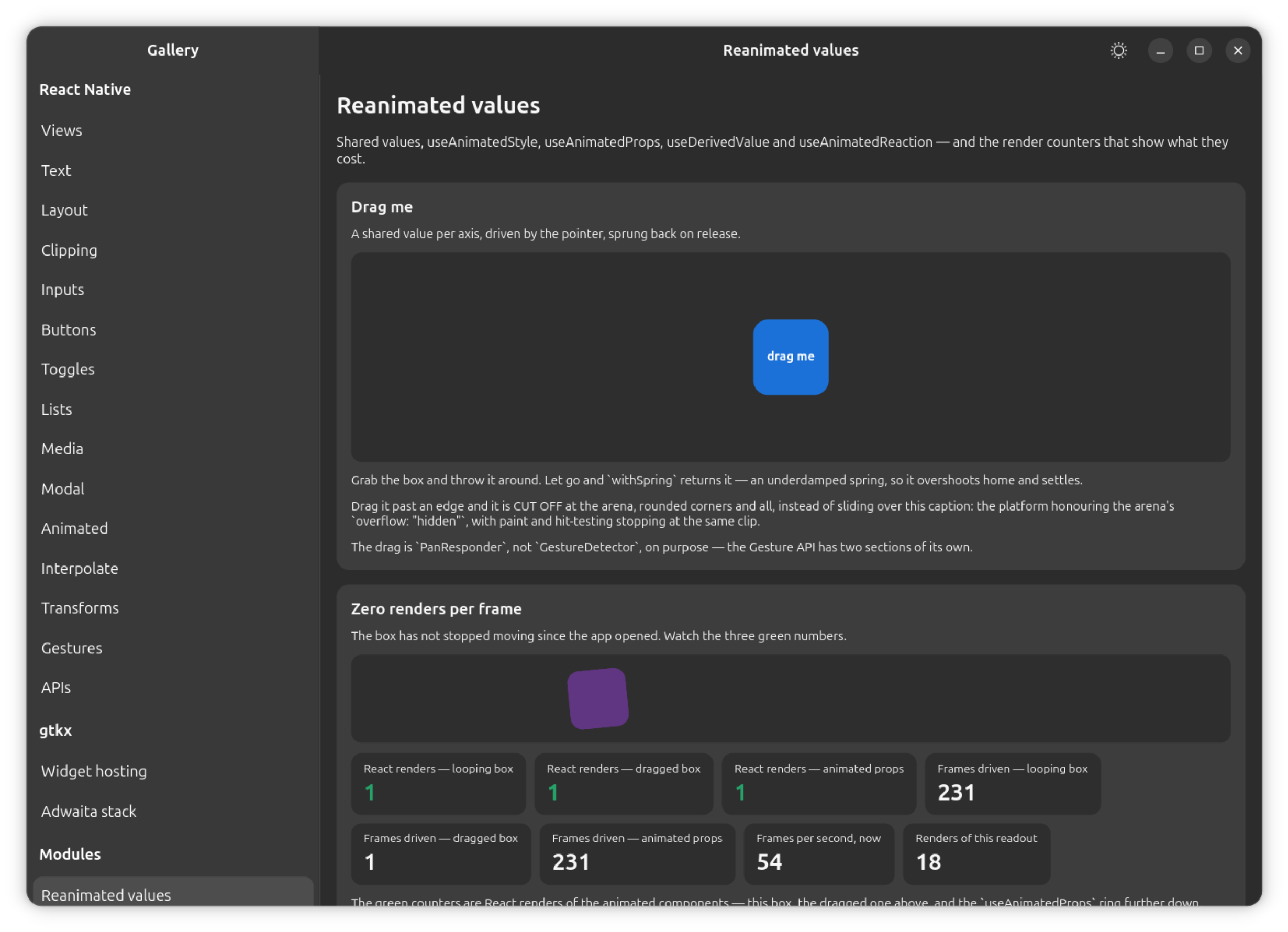
useSharedValue, makeMutable, isSharedValue and cancelAnimation are
fully implemented. A shared value doubles as one of the platform's own
animated nodes, so it can be handed straight to a View's style, in addition
to being read inside useAnimatedStyle.
A shared value can be written either of two ways:
sharedValue.value = x
sharedValue.set(x) // also takes an updater: count.set((c) => c + 1)
Both are real and both work; .get()/.set() is the pair upstream added for
exactly one situation this platform inherits. The React Compiler — on by
default on the vite path (see
the Guide's toolchains page) —
treats anything a hook returns as frozen, so react-hooks/immutability
reports every assignment to .value, including ones inside a callback or
effect that are perfectly legitimate. .get()/.set() lints clean
everywhere; .value keeps working, so a ported app never has to be
rewritten.
Differs from react-native-reanimated: SharedValue.addListener accepts both
upstream's (listenerID, listener) signature and this platform's own
animated-node signature, (callback) => id. Both call sites are real in
practice, and supporting only one would fail the other silently.
with*() animations
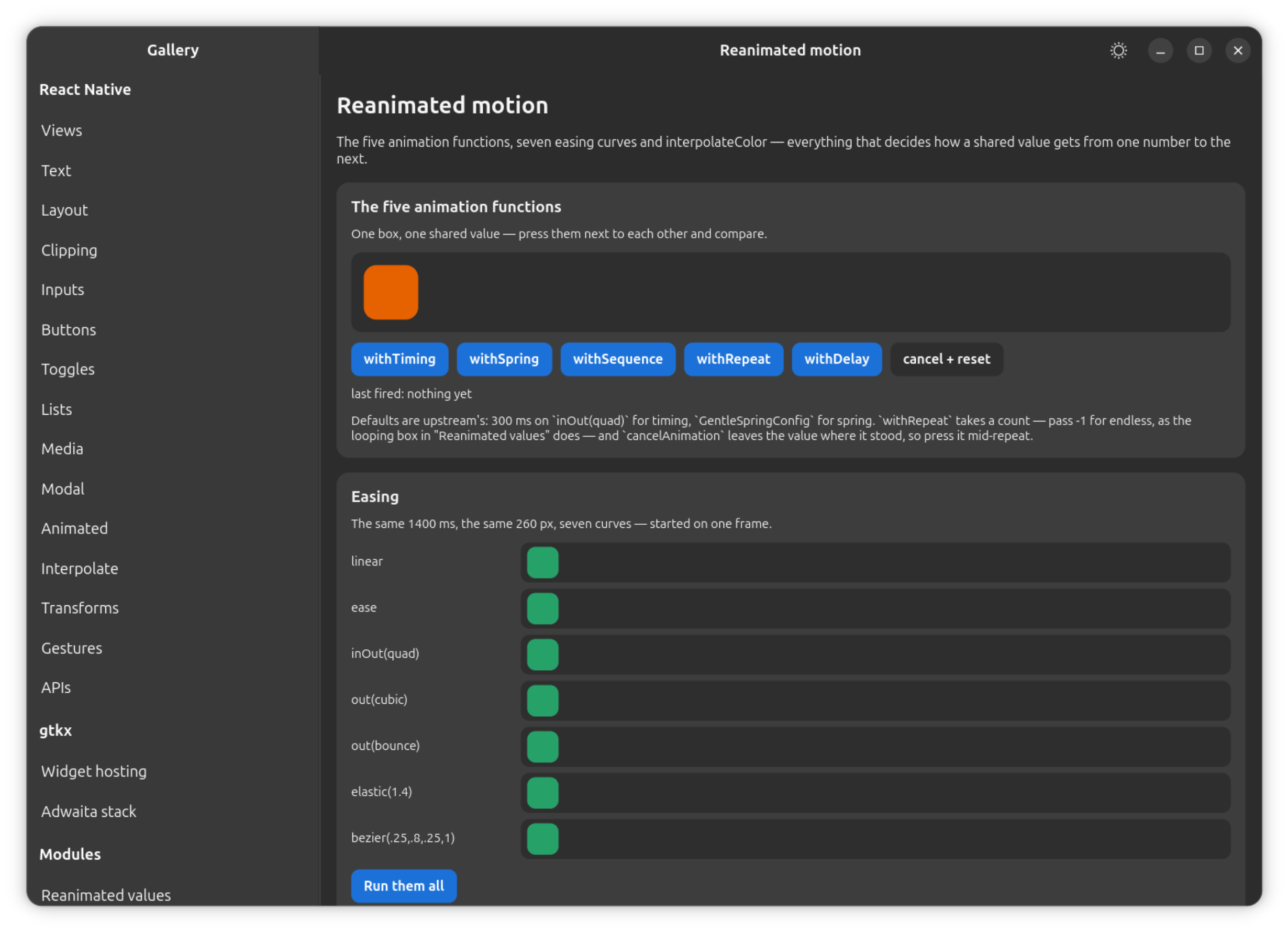
withTiming, withSpring, withSequence, withRepeat and withDelay are
fully implemented for numeric values, on upstream's own defaults (timing:
300 ms, Easing.inOut(Easing.quad); spring: GentleSpringConfig), driven by
the platform's single frame scheduler. Each can be assigned directly to a
shared value or returned from a useAnimatedStyle/useAnimatedProps
updater.
Differs from react-native-reanimated: re-aiming a running animation (giving it a new target while it is mid-flight) keeps the animation's current value but takes only the new descriptor's velocity — upstream also carries the previous animation's velocity across the re-aim. A target that moves every frame ends up slightly more damped here than upstream.
withDecay and withClamp are fully implemented, including velocity,
deceleration, velocityFactor, clamp and rubberBandEffect — upstream's
own step function, ported. withDecay is what an inertial fling rides on:
released with a velocity, it coasts, decelerates, and stops with no target
to reach. withClamp runs its inner animation un-truncated and only clips
what reaches the value, which is observable on an overshooting spring —
upstream's own distinction.
Differs from react-native-reanimated: withDecay's config (clamp shape,
velocityFactor > 0, rubberBandEffect needing a clamp) is validated at
the withDecay() call itself rather than on the animation's first frame —
same errors, one line earlier.
Differs from react-native-reanimated: the spring's rest condition is derived
differently. Upstream stops a spring once its remaining energy drops below a
fraction of its initial energy; this platform's solver stops on displacement
and speed thresholds, derived from the same energy budget. The stopping
point differs by well under a pixel. A layout-animation builder's
.restDisplacementThreshold() and .restSpeedThreshold() are accepted and
ignored for the same reason.
Spring presets
Eight named configs ship as plain data, mirrored exactly from upstream:
| Preset | Values |
|---|---|
Reanimated3DefaultSpringConfig | damping: 10, mass: 1, stiffness: 100 |
Reanimated3DefaultSpringConfigWithDuration | duration: 1333, dampingRatio: 0.5 |
WigglySpringConfig | damping: 90, mass: 4, stiffness: 900 |
WigglySpringConfigWithDuration | duration: 550, dampingRatio: 0.75 |
GentleSpringConfig | damping: 120, mass: 4, stiffness: 900 — withSpring's default |
GentleSpringConfigWithDuration | duration: 550, dampingRatio: 1 |
SnappySpringConfig | damping: 110, mass: 4, stiffness: 900, overshootClamping: true |
SnappySpringConfigWithDuration | duration: 550, dampingRatio: 0.92, overshootClamping: true |
Animating an object or array, not just a number
An animated value can be a plain object or array whose leaves are numbers —
upstream's real AnimatableValue, minus color strings (see below).
withTiming({ x: 10, y: 20 }) and withSpring interpolate every leaf on the
same curve and the same clock: a nested object recurses, and an array's own
elements are always numbers, never nested — upstream's own asymmetry. The
completion callback fires once per animation, not once per leaf, and
composing through withDelay/withSequence/withRepeat carries a shape
exactly as it carries a plain number.
Differs from react-native-reanimated: a target whose shape does not match
the value it is animating from throws, naming the mismatched leaf, rather
than silently dropping the key the way upstream's from-value-driven walk
does. A key that previously held a plain number seeds an animation from that
number, unchanged from upstream; a key that previously held a plain object
does not — upstream's own prepareAnimation has no branch for a plain data
object either, so it is seeded at the target exactly like a key that was
absent. An {x, y} withTiming costs about twice a single number's own
per-frame cost, measured before the result ever reaches a style property.
useDerivedValue and useAnimatedReaction
Both are fully implemented, along with the startMapper/stopMapper
primitive they are built on — a few libraries reach for that primitive
directly. Mappers are torn down on unmount. inputs, the static candidate
list the Babel plugin would otherwise produce, is accepted and ignored:
tracking is dynamic, so a mapper subscribes to what it actually reads rather
than to what it was told to expect.
useAnimatedStyle and useAnimatedProps
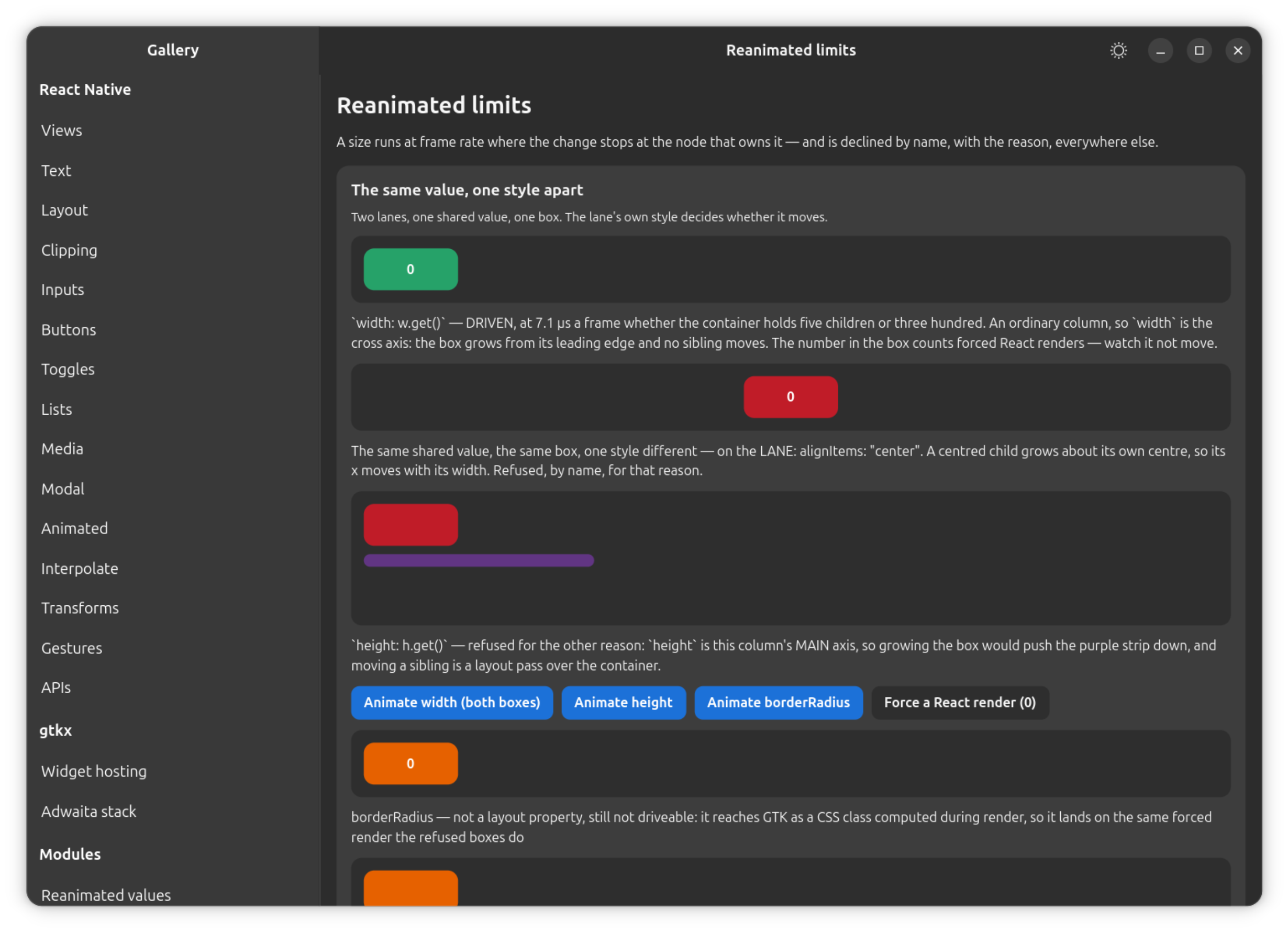
What this platform can write to a mounted widget without a React render is a fixed set of properties — the honest boundary of the surface, not a temporary limit:
| Property | Reached through | How it reaches GTK |
|---|---|---|
opacity | useAnimatedStyle | gtk_widget_set_opacity, straight from the animation frame. |
transform (translateX/Y, scale, scaleX/Y, rotate/rotateZ) | useAnimatedStyle | The rect store plus one queued allocation, applied as a GskTransform. No 3D, no skew, no matrix — the same list the static transform style takes. |
top, left, right, bottom — only on a node whose own position is "absolute" | useAnimatedStyle | Turned into a translation from the position the committed layout gave it — the same rect store, the same queued allocation. |
width, height — only where the change is confined to the node that owns it | useAnimatedStyle | The node's own subtree is re-laid-out pinned to the driven value, into the rect store as an override. |
backgroundColor, color, borderColor (and per side), outlineColor | useAnimatedStyle | A GtkCssProvider private to that widget, reloaded in place. |
The numeric SVG props (r, cx, strokeWidth, strokeDashoffset and the rest of the geometry and paint numbers) | useAnimatedProps | The shape's own descriptor plus queueDraw — the SVG components already subscribe to an animated node themselves. |
Colors deliberately do not go through the memoized class registry the static
styles use. That registry keys on generated CSS text, so a color driven
through it would mint a class per animation frame into one process-wide
stylesheet that GTK re-parses whole and never prunes. The private provider
has no cache and no document, so nothing about the static path changes.
Every animated component gets this, not only Animated.View — the write
path is a hook over "a widget and its parent", so Animated.Text and
anything through createAnimatedComponent animate colors on the same terms.
Differs from react-native-reanimated: the remaining layout properties —
flex, flexBasis, every margin*/padding*, gap, the min*/max*
family — are refused rather than driven at frame rate. Each needs a Yoga
pass plus the commit walk that follows it, and that cost scales with the
container rather than with the animated value, while a transform or a
color's cost stays flat regardless of tree size. A useAnimatedStyle that
changes one of these warns once for that property, names it as a layout
property, and names the transform to use instead. The value is not dropped:
it is applied on the next React render, and when the value comes from an
animation the updater returned (height: withTiming(320)), that render is
produced automatically — when the animation reaches its target, and at most
once every 100 ms while it is on its way. That is at most ten renders a
second, never one per frame.
scaleX/scaleY are an approximation for width/height, not a
replacement, and the warning for a refused size says so. A scale grows
around the view's center, so the box moves as it grows, where a real width
change would not move it; and it scales the box's content with it instead
of re-laying it out, so wrapped text keeps its old line breaks and is drawn
stretched rather than re-wrapped. Reach for a scale when the content can
tolerate being stretched — a plain box, an image. translateX/translateY
for insets are exact and carry no such caveat.
The first exception: insets on an absolutely positioned node
top, left, right and bottom are driven at frame rate on a node whose
own position is "absolute". Such a node is out of flow, so moving it
changes nothing but where it is drawn — which makes an inset exactly a
translation from the position the committed layout gave it, and lets it run
on the transform path with no Yoga pass at all. This is the shape the whole
sortable-list ecosystem is built on:
const style = useAnimatedStyle(() => ({
  position: "absolute",
  left: 0,
  right: 0,
  top: top.value, // driven, with no Yoga pass
}))
A few things follow from that:
- It composes with your own transform rather than replacing it. The
derived translation is applied outermost, so it moves the
already-rotated, already-scaled box by the distance the layout asked for
— a
top: 100underscale: 2moves the box 100 px, not 200. rightandbottominvert, because they measure inward from the far edge: a larger value moves the node toward the origin.- An axis anchored by both edges is still refused, because it is no
longer a translation.
left: 0, right: 0with nowidthderives the width from both edges, so animatingleftthere resizes the node; with a definitewidth, Yoga honorsleftand ignoresrightentirely, so animatingrightwould invent motion a real layout pass would not produce. Both cases warn in their own words and name a working configuration. measure()reports the committed layout, not the translated position — see Gesture and scroll integration.positionmay live in a sibling style entry, as instyle={[styles.row, useAnimatedStyle(() => ({ top: y.value }))]}— the decision is made against the flattened style, not against the updater's object alone.
The second exception: a size confined to the node that owns it
width and height are driven at frame rate where the change stops at the
node: the node's own subtree is re-laid-out pinned to the driven value, the
result goes into the rect store as an override, and one queued allocation
puts it on screen. Nothing above the node is visited and nothing is written
into Yoga, so the cost tracks the size of the node rather than of its
container.
// A progress bar, a disclosure panel, a sliding drawer — all the same shape.
const style = useAnimatedStyle(() => ({ width: width.value }))

<View style={{ width: 400, height: 700 }}>
  {/* the container's width is its own, so nothing this box does can move it */}
  <Animated.View style={[{ height: 60 }, style]}>
    <Text>re-wraps as the box grows, which a scaleX does not</Text>
  </Animated.View>
  <View style={{ height: 20 }} />
</View>
This is a real layout, not a stretch: the content inside is re-laid-out at
the new size, text re-wraps, a flex row inside redistributes, a stretched
child follows — which is the difference from scaleX and the reason this is
a Yoga pass at all.
The precondition is measured, and the refusal applies wherever it does not hold:
- The axis is the container's cross axis — a
widthin a column, aheightin a row. A main-axis size pushes every following sibling along, which is the layout pass the refusal exists to avoid. - The container's size on that axis does not come from its children — a
definite or percentage size, a
flexfrom its own parent, orstretchon its parent's cross axis. A content-sized container would grow with the node. - The node's other axis does not come from its content — a box with
height: autoaround wrapping text gets taller as it gets narrower, and everything after it moves. - The node's resolved cross-axis alignment is
flex-startorstretch—centerandflex-endmove the node's own origin as it grows. - No
aspectRatioand nomin/maxon that axis — the first ties the other axis to this one, and the second clamps the driven value, so the box silently stops following the animation. - The container does not wrap, which would resize the node's line and move every line after it.
- An absolutely positioned node qualifies on either axis, as long as that
axis' start edge (
left,top) is anchored — it then grows from an origin that does not move, and being out of flow, it touches nothing at all. This does not apply under anIntrinsicRoot, which reports its Yoga content size to GTK as the window's own size request — a size below it deliberately never goes into Yoga, so the island would keep its old request while the node draws outside it.
Three more properties of this path are worth knowing:
- The container's
flexDirectionandalignItemsare usually not present in the updater's own object —style={[styles.bar, useAnimatedStyle(() => ({ width: w.value }))]}is the ordinary spelling, and the decision is taken against the real layout tree either way. - The driven size survives an unrelated engine flush: it is kept as an override next to the animated offset rather than written over the committed rect, so a window resize — or any other reason the tree re-commits mid-animation — cannot drop a frame of it.
measure()reports the committed layout, not the driven size, exactly as it does for a transform or an animated inset — see below.
measure() on a node moved this way
measure() on a node whose position or size is being driven reports the
layout rect, not the paint position: the node's Yoga top (or width/
height) did not change, only its allocated and painted position did. So
x/y/width/height are the committed layout, untranslated, while
pageX/pageY follow GTK's real transform chain and report where the node
is actually drawn. measureInWindow and measureLayout follow pageX/
pageY. This is the same split an explicit translateY has always
produced here.
zIndex
zIndex is driven, animated or not, and costs what opacity costs — one
widget write, no Yoga pass, no CSS. The shape a sortable list produces every
frame ({ position: "absolute", left: 0, right: 0, top: top.value, zIndex: moving ? 1 : 0 }) drives both top and zIndex and warns about neither.
Everything else in the style
Borders, radii and shadows still reach GTK as a CSS class computed during
render; a useAnimatedStyle that changes one of them names it once in a
warning and applies its latest value on the next React render — produced
automatically when the value comes from an animation, exactly as for a
refused layout property. useAnimatedProps follows the same rule with the
same warning: a numeric prop is driven, anything else is named and lands on
the next render.
An animation returned from the updater
useAnimatedStyle(() => ({ height: withSpring(open.value ? 320 : 0) })) is
how Reanimated's own documentation writes an animation, and it runs here on
the platform's one frame scheduler. Three rules — all upstream's, read out
of its own styleUpdater/prepareAnimation, not inferred — decide what a
given mapper run does with it:
- A key animating for the first time is seeded at its target, not animated to it — there is nothing to animate from.
- A key whose previous updater result held a plain number animates from
that number, so the common "snap shut, open smoothly" shape works:
useAnimatedStyle(() => ({ height: open.value ? withTiming(200) : 100 }))anduseAnimatedStyle(() => ({ opacity: visible.value ? withTiming(1) : 0 }))both run their full range over the animation's duration rather than jumping. - A later run producing the same animation does not restart it — compared by target and shape rather than by object identity, since a mapper re-runs many times a second and every run builds a fresh descriptor.
The reverse direction is not the mirror image: when a plain number replaces a running animation, the animation is cancelled and the number lands at once — it does not ease back, and no settle is reported. That matches upstream, which deletes the animation and pushes the plain value in the same mapper run rather than symmetrizing the two directions. On a driven property the number reaches the widget on that frame; on a refused one, the snap is a React render, produced for the caller automatically rather than waiting for a cadence or a settle that will never come.
A percentage or a color string in the previous result is not a starting point a numeric driver can use, so those fall back to being seeded at the target.
Animating an SVG shape
useAnimatedProps reads exactly as it does on mobile:
import { Circle, Svg } from "react-native-gtkx/svg"
import Animated, {
  useAnimatedProps,
  useSharedValue,
  withTiming,
} from "react-native-reanimated"

const AnimatedCircle = Animated.createAnimatedComponent(Circle)

const Pulse = () => {
  const r = useSharedValue(10)
  const animatedProps = useAnimatedProps(() => ({ r: r.value }))
  return (
    <Svg
      width={100}
      height={100}
      onLayout={() => (r.value = withTiming(40))}
    >
      <AnimatedCircle
        cx={50}
        cy={50}
        fill="green"
        animatedProps={animatedProps}
      />
    </Svg>
  )
}
Interpolation and color
interpolate, clamp and Extrapolation (with its deprecated alias
Extrapolate) are fully implemented, including per-edge extrapolation
modes. Easing is fully implemented, including Easing.bezier's factory
shape.
interpolateColor, convertToRGBA, isColor and rgbaArrayToRGBAColor are
fully implemented for the 'RGB' color space (upstream's 2.2-gamma
interpolation) and 'HSV' (upstream's hue-wrap correction), including
'transparent' handling.
Differs from react-native-reanimated: the 'LAB' color space throws by
name. Upstream's 'LAB' support is a vendored slice of the culori library
fed 0-255 channels, where culori itself documents a 0-1 range — matching
upstream here would mean matching that scaling bug rather than the color
space itself.
Differs from react-native-reanimated: interpolateColor only accepts color
strings as input, never PlatformColor. A theme color has no numeric value
until GTK resolves it against the live Adwaita theme, so there is nothing to
blend between keyframes; passing one throws, naming the case.
PlatformColor is the platform's own: a theme color addressed by name,
resolved by GTK against the live Adwaita palette (var(--accent-bg-color)
and the rest). It can be animated between on a shared value — assign one
PlatformColor and then another, and a shared value transitions cleanly —
but it cannot be interpolated through, for the reason above.
Differs from react-native-reanimated: processColor and DynamicColorIOS
throw by name. processColor returns RN's packed AARRGGBB integer, whose
only real consumer is a native module that unpacks it; there is no native
module here, a color's destination is a GTK stylesheet, and a stylesheet
takes strings. Refusing beats handing back a number nothing downstream would
accept.
Gesture and scroll integration
useAnimatedRef and measure are fully implemented, and callable from
anywhere — there is no worklet boundary to be inside of. measure returns
null before the first committed layout, matching RN's own contract. See
above for what it reports on a node
whose position or size is being driven.
useAnimatedScrollHandler is fully implemented for onScroll, riding a
path that already existed: ScrollView's emitScroll runs from a
GtkAdjustment::value-changed handler, a C callback on the same loop this
JS runs on — so a handler that writes a shared value gets Reanimated's
promise (no React render per scroll event) with no extra event machinery.
Hand the result to a scrollable's onScroll prop; the handler receives
Reanimated's flattened event shape (event.contentOffset.y, not
event.nativeEvent) carrying the three measurements a GtkScrolledWindow
can report, plus one context object shared across every call.
onBeginDrag, onEndDrag, onMomentumBegin and onMomentumEnd are all
called: a mouse-wheel burst produces one synthetic begin/end pair with no
momentum phase, while a touchpad glide produces all four phases from its
native gesture sequence. The wheel pair is a documented desktop extension —
RN has no wheel input to model. contentInset, velocity and zoomScale
are absent from the event rather than invented as zero.
scrollTo(ref, x, y, animated) is fully implemented against a
useAnimatedRef-pointed scrollable: because this is the same thread that
owns the widget, it calls the scrollable's own imperative scrollTo
synchronously.
Differs from react-native-reanimated: the argument order is upstream's
positional form rather than RN's options object, so library call sites are
unaffected. animated is accepted and ignored, matching ScrollView's own
behavior. A ref pointing at nothing, or at a component with no scroll API,
is silently ignored rather than throwing, matching upstream.
useScrollOffset and useScrollViewOffset are fully implemented: a shared
value that tracks a scrollable's current offset, updated directly from the
adjustment's own value-changed signal — no onScroll prop required and no
React render per event. They take upstream's argument for writing into a
shared value the caller already owns, and upstream's own axis rule (x when
a horizontal offset exists, y otherwise). Point one at a ScrollView, a
FlatList (which resolves through to the ScrollView it renders
internally), or an Animated.ScrollView; pointing one at anything else
warns once and the value stays 0. Cost is about 5 µs per scroll event
while tracking, and nothing while not — the hook connects on mount and
disconnects on unmount.
useHandler is fully implemented. Its doDependenciesDiffer is always
false — not a stub, a statement: upstream needs that check because a
worklet is a by-value snapshot that can go stale, and here a handler is an
ordinary closure read out of a ref at call time, so it never goes stale.
useWeb reports true, for the same reason the whole surface sits on
upstream's own web implementation.
useEvent is implemented for scroll event names only — onScroll,
onScrollBeginDrag, onScrollEndDrag, onMomentumScrollBegin,
onMomentumScrollEnd. The value it returns goes straight on a scrollable's
onScroll prop, which is the actual subscription mechanism here — the same
object useAnimatedScrollHandler returns, so a hand-built handler and the
stock one behave identically.
Differs from react-native-reanimated: any other event name throws where it
is requested, naming itself — there is no native event registry to
subscribe an arbitrary event name against, and a subscription that could
never fire is exactly the failure mode this package refuses everywhere else.
rebuild is accepted and ignored, for the same reason doDependenciesDiffer
is always false. .workletEventHandler throws — it exists upstream to
register a native view tag, and there is neither a native view nor a tag
here.
Threads: runOnUI / runOnJS
There is one thread, so runOnUI and runOnJS have nothing to cross — but
they are not inlined. Both schedule rather than run immediately, and both
return void, matching upstream. A "UI" hop is queued as a task and an "RN"
hop as a microtask, so a UI hop still resolves later than an RN hop queued
at the same instant — the same relative order upstream produces — without
waiting for an animation frame the way upstream's own web build does
(requestAnimationFrame stands in there for a UI runtime the web doesn't
have; React Native's real UI thread does not wait for one either, and
neither does this platform).
Waiting for a frame that never needed to be waited for is not cosmetic: a
scheduleOnUI(measure) / scheduleOnRN(use the result) round trip that
waits a full frame is longer than the gap between two GTK pointer events,
and produces an observable hover-flicker in drag interactions if it
regresses.
scheduleOnUI and scheduleOnRN are react-native-worklets' own names for
the same mechanism, and are the very same functions re-exported — see
Worklets below.
Animated.View, Animated.Text, Animated.Image, Animated.ScrollView
Animated.View is the platform's own View, unchanged, taking a ref that
gives measure/measureInWindow/measureLayout. Animated.Text,
Animated.Image and Animated.ScrollView are createAnimatedComponent
over the platform's own components — no subclass, no special case — and all
three forward ref through, so useAnimatedRef + measure() works on them
exactly as on Animated.View.
createAnimatedComponent adds no widget to the tree. It renders the
component it wraps and reaches that component's widget through the ref it
already exposes, so the GTK output is exactly what the unwrapped component
produces — wrapping a component in an extra layer would change flex layout
for its children and change what measureLayout is relative to, which is a
different tree, not a shim. Wrap anything that takes a ref exposing the
geometry methods; anything else gets a named warning rather than a silent
no-op.
Differs from react-native-reanimated: Animated.FlatList throws by name
rather than working. Unlike View/Text/Image/ScrollView, FlatList
is a composite over a windowed core over a ScrollView — the ScrollView
is the only thing in that chain that owns a widget, and FlatListHandle is
a scroll API by contract, so there is no widget to read back out of its
ref. Upstream's Animated.FlatList mostly exists so onScroll can be an
Animated.event/useAnimatedScrollHandler, and that hook is implemented
here directly — a plain FlatList already takes it on its own onScroll
prop and needs no animated wrapper for it. Put an animated style on an
Animated.View around the list, or use Animated.ScrollView when
virtualization isn't needed.
addWhitelistedNativeProps and addWhitelistedUIProps, both reachable off
the default export, are accepted and do nothing — documented no-ops
upstream too, since the allow-lists they used to write to no longer exist in
Reanimated itself. They are kept callable so startup code that calls them
does not fail on a line that already did nothing upstream.
Layout animations
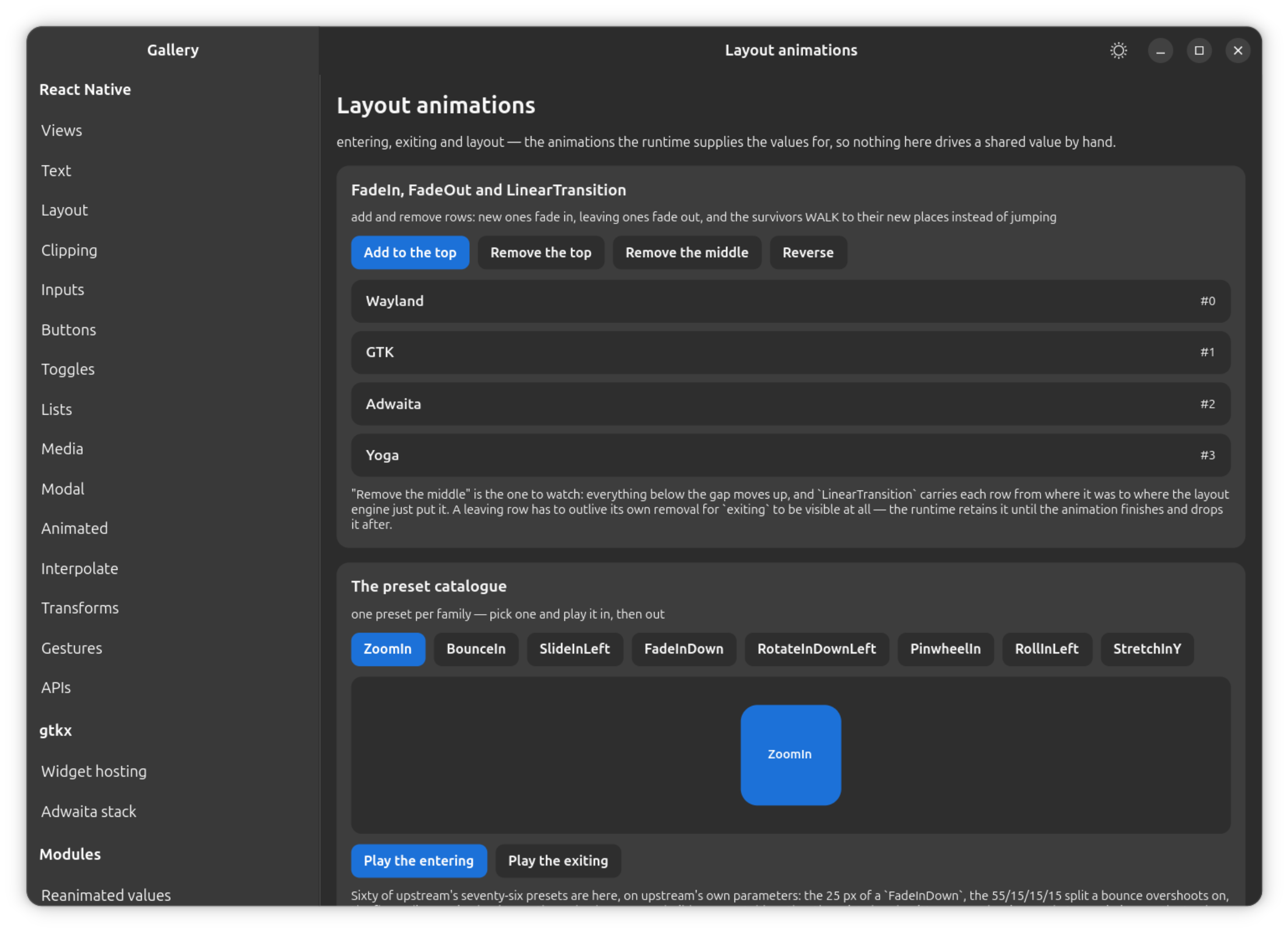
entering, exiting and layout props work on every animated component —
Animated.View, Animated.Text, Animated.Image, Animated.ScrollView,
and anything wrapped with createAnimatedComponent — because they are added
by wrapping a component rather than by subclassing it, and the wrapper adds
no widget to the tree, exactly like createAnimatedComponent itself.
<Animated.View
  entering={FadeIn.duration(300)}
  exiting={FadeOut}
  layout={LinearTransition.springify()}
/>
entering writes the builder's initial values in the same commit that
mounts the widget, so it is never drawn un-faded, not even for one frame,
and animates from there. layout watches for the layout engine committing a
different rect for that child, and walks it from where it was to where the
engine put it.
Differs from react-native-reanimated: layout animates the position as a
translation and applies a size change immediately, rather than animating
both. Upstream's LinearTransition animates originX/originY/width/
height together; here, the origins are still honored as a translation —
composed with whatever transform the style already has, so a row that
scales while a list reorders does both — but a size change lands on the
next commit instead of animating, for the same reason useAnimatedStyle
refuses to drive most sizes: animating a size means a Yoga pass whose cost
is the tree's, not the animated value's. CurvedTransition's
.easingWidth()/.easingHeight() are accepted and ignored for the same
reason; its two position easings are honored.
exiting and widget retention
exiting needed a primitive nothing else in this surface required. An exit
animation has to keep drawing a widget that React has already reconciled
away, and React's deletion is neither asynchronous nor negotiable — in one
synchronous commit it runs the unmounting subtree's cleanup and unparents
its topmost widget. The platform holds the widget through a
widget-retention mechanism, the same one react-native-gtkx/adw's
NavigationStack uses to keep a page on screen while it slides out:
- The widget is put back into the same container, at the end of the child list, so it draws over the siblings closing the gap rather than under them.
- Its Yoga node leaves the layout tree immediately, so an exiting view does not hold its space open — the row below it moves up at once, and the exit animation plays over the top.
- Every container inside the retained subtree keeps its layout manager until the animation ends, so the exiting view's own children stay exactly where they were.
- A fallback timer always runs, armed from the animation's declared length. Whichever arrives first — the animation's real end or the timer — drops the widget, so a spring that never settles, a dead frame source, or an animation that never started cannot leave a widget parented, drawn and hit-testable forever.
exiting is skipped when the component's own container is unmounting in
the same commit — there is no container left to hold the widget in, and an
exit animation inside a disappearing parent has no one left to be seen by.
Keyframe and the *Transition builders
FadeIn, FadeOut, LinearTransition (and its deprecated alias Layout)
and Keyframe are fully implemented, exposing upstream's fluent surface —
.duration(), .delay(), .easing(), .springify() and the spring
parameters, .rotate(), .withInitialValues(), .withCallback() — usable
as the class itself or as a built instance.
BaseAnimationBuilder and ComplexAnimationBuilder both resolve to one
class. Upstream splits the plain chain from the spring-parameter chain into
two classes; this platform does not, and a library subclassing either name
keeps working.
Four more layout transitions beside LinearTransition are fully
implemented: CurvedTransition, FadingTransition, JumpingTransition,
SequencedTransition, plus EntryExitTransition, which composes an
entering builder and an exiting builder into one layout animation. Each
follows the same paint-only position rule as LinearTransition above.
LayoutAnimationConfig is fully implemented: <LayoutAnimationConfig skipEntering skipExiting> suppresses the animations of the subtree below
it and adds no widget. enableLayoutAnimations warns and does nothing,
matching upstream exactly, where it is deprecated and its allow-list is
gone.
The preset catalog
60 of upstream's 76 layout-animation presets are implemented, on upstream's
own parameters, sharing one builder class over a parameter table. (FadeIn
and FadeOut themselves ship as the hand-written base builders described
above, alongside Keyframe and LinearTransition, rather than as table
entries — the family below covers the rest of upstream's Fade* set.)
| Family | Presets |
|---|---|
| Bounce (10) | BounceIn, BounceInDown, BounceInLeft, BounceInRight, BounceInUp, BounceOut, BounceOutDown, BounceOutLeft, BounceOutRight, BounceOutUp |
| Fade (8) | FadeInDown, FadeInLeft, FadeInRight, FadeInUp, FadeOutDown, FadeOutLeft, FadeOutRight, FadeOutUp |
| Pinwheel (2) | PinwheelIn, PinwheelOut |
| Roll (4) | RollInLeft, RollInRight, RollOutLeft, RollOutRight |
| Rotate (8) | RotateInDownLeft, RotateInDownRight, RotateInUpLeft, RotateInUpRight, RotateOutDownLeft, RotateOutDownRight, RotateOutUpLeft, RotateOutUpRight |
| Slide (8) | SlideInDown, SlideInLeft, SlideInRight, SlideInUp, SlideOutDown, SlideOutLeft, SlideOutRight, SlideOutUp |
| Stretch (4) | StretchInX, StretchInY, StretchOutX, StretchOutY |
| Zoom (16) | ZoomIn, ZoomInDown, ZoomInEasyDown, ZoomInEasyUp, ZoomInLeft, ZoomInRight, ZoomInRotate, ZoomInUp, ZoomOut, ZoomOutDown, ZoomOutEasyDown, ZoomOutEasyUp, ZoomOutLeft, ZoomOutRight, ZoomOutRotate, ZoomOutUp |
The 16 presets not implemented — the twelve Flip* and four LightSpeed*
— are covered in What is not implemented below.
rotate on any preset or builder is carried as degrees rather than
upstream's '90deg'/'5rad' strings — a numeric animation cannot carry a
unit, and the matrix that reaches GTK is identical either way. A builder's
own .rotate() and a .withInitialValues() angle still accept either
spelling.
useAnimatedKeyboard
useAnimatedKeyboard returns real shared values — height and state —
that are honored and never updated, the same shape and the same reason as
the portable Keyboard API's own desktop semantics: every number this hook
reports describes a software panel sliding over the app and taking screen
space from it, and a desktop has no such panel. height reads 0 because
the keyboard occupies nothing, and state reads KeyboardState.CLOSED
because it is — deliberately not UNKNOWN, which upstream seeds only until
the native side reports and which would be false here permanently.
Both are real shared values, not frozen constants: a useAnimatedStyle
reading them subscribes, computes and settles exactly once, so a layout
that offsets itself by keyboard.height.value lands where it should rather
than throwing. An app written for three platforms keeps one source and gets
the right answer on this one too. options (upstream's Android
translucency configuration) is accepted and ignored — it describes how the
keyboard's rectangle relates to a system bar, and there is neither.
Version reporting, logging and reduced motion
reanimatedVersion reports "4.5.3" — the upstream version this surface's
API mirrors, not a claim to literally be that package. Libraries that gate
behavior on a version number read this and take the right branch.
isConfigured and isReanimated3 both return true — upstream's own
deprecated presence checks, and the honest answer here is yes.
configureReanimatedLogger is accepted and does nothing: there is no second
Reanimated logger to configure here, and refusing the call would break
startup code that calls it for a setting that changes nothing.
ReanimatedLogLevel is mirrored as plain data (warn = 1, error = 2).
ReduceMotion is mirrored as an enum (System, Always, Never), and
every value behaves as Never; useReducedMotion() always returns false.
No reduce-motion source is wired up on this platform yet — GNOME's
gtk-enable-animations setting is the signal to read once it is.
Test helpers
withReanimatedTimer, advanceAnimationByTime and advanceAnimationByFrame
are real, not an emulation: the frame driver every animation on this
platform runs on is the platform's own, so a test takes that same driver and
steps it directly, rather than upstream's approach of faking Jest's timers
and synthesizing frames on top of them. withReanimatedTimer also accepts
an async body.
Assert against the widget once the clock has been stepped —
widget.getOpacity(), widget.computeBounds(stage), widget.measure() —
rather than reading a style object back. Driven by withReanimatedTimer +
advanceAnimationByTime, those reads are deterministic. See
What is not implemented for getAnimatedStyle
and setUpTests, which read a style back and are refused.
What is not implemented
Each of these throws when called, rendered, or — for the handful that are plain values upstream — merely accessed, naming itself in the message. A symbol not listed at all in the module fails earlier still, at bundle time, with the bundler's own "no export named X".
- Color packing for a native module —
processColor,DynamicColorIOS. Both exist to hand a value to a native module; there is no native module here, and a GTK stylesheet takes strings, not packed integers. - 3D and skewed layout-animation presets — the twelve
Flip*(FlipInEasyX/Y,FlipInXDown/Up,FlipInYLeft/Right,FlipOutEasyX/Y,FlipOutXDown/Up,FlipOutYLeft/Right) and fourLightSpeed*(LightSpeedInLeft/Right,LightSpeedOutLeft/Right).Flip*needs a real 3D rotation (perspectiveplusrotateX/rotateY); this platform folds every transform into one 2D affine matrix, which has no third axis.LightSpeed*needsskewX, which is left out of the platform's whole transform surface on purpose, not only from this catalog. - Shared element transitions —
SharedTransition,SharedTransitionBoundary. Needs asharedTransitionTagprop, an overlay layer above the navigation stack, and a retention primitive that reparents the leaving widget — none of which exist. The platform's own retention primitive (used byexiting, above) deliberately holds a widget in its own parent instead. Upstream's own web build does not implement this either. - Reanimated 4's CSS animations —
css,createCSSAnimatedComponent,cubicBezier,linear,steps. Not reached by this surface. - Sensor, composed-event and frame-callback hooks —
useAnimatedSensor,useComposedEventHandler,useFrameCallback,useTimestamp. No sensor source and no per-frame callback registry on this platform. - Worklet-runtime primitives —
createWorkletRuntime,runOnRuntime,executeOnUIRuntimeSync. A second runtime is structural — there is one thread here, and upstream's own non-nativeruntimes.tsthrows for these too on a single-runtime build. - Native-module-only functions —
dispatchCommand,getRelativeCoords,setGestureState,setNativeProps,getViewProp,createAnimatedPropAdapter,NativeEventsManager,getUseOfValueInStyleWarning. Each crosses to a native view manager that does not exist here. - Orientation and sensor enums —
InterfaceOrientation,IOSReferenceFrame,SensorType. No source of truth for any of them on a desktop. - Screen transitions —
ScreenTransition,startScreenTransition,finishScreenTransition. Not reached by this surface. - Dev tooling —
PerformanceMonitor,ReducedMotionConfig,getDynamicFeatureFlag,getStaticFeatureFlag,setDynamicFeatureFlag. Not reached by this surface. - Style read-back —
getAnimatedStyle,setUpTests. Upstream'sgetAnimatedStylereturns the style object its updater produced, which exists on mobile only because its Jest path mirrors it onto the component. Here a style is taken apart at bind time — opacity to the widget, colors to a private CSS provider, the wholetransformarray folded into one matrix in the rect store — so there is no such object left to return, at any point after bind time.setUpTestsexists only to installtoHaveAnimatedStyle/toHaveAnimatedProps, bothgetAnimatedStyleunder a matcher. - Definition helper —
defineAnimation. Not reached by this surface. - Animated component —
Animated.FlatList. A composite with no widget of its own to expose through a ref — see Animated.View, Animated.Text, Animated.Image, Animated.ScrollView above.
Worklets (react-native-gtkx/worklets)
Reanimated 4 moved its worklet surface out of Reanimated and into its own
package, react-native-worklets, and libraries increasingly import it under
that name directly rather than through Reanimated. Aliasing
react-native-reanimated alone leaves that import wall standing one
package over — and it is an import-time wall, not a runtime one:
react-native-reanimated-dnd 2.0.0 pulls scheduleOnRN and scheduleOnUI
out of react-native-worklets at module scope, in five of its hooks
(useDraggable, useDroppable, useSortable, useHorizontalSortable,
useGridSortable), with no try { require } catch guarding any of them —
so an unaliased package name fails the whole module at import time rather
than at the point a function is called. Both the vite and Metro presets
alias react-native-worklets onto react-native-gtkx/worklets, so an app
keeps its source unchanged.
The surface itself already exists inside the Reanimated subpath; this
package adds the name. runOnUI, scheduleOnUI, runOnJS and
scheduleOnRN reached through either package name are the same instance,
not two copies — a job queued through one lands in the same batch, in the
same order, as a job queued through the other. Upstream has this same
property for the same reason: Reanimated re-exports these functions from
react-native-worklets rather than keeping a second copy of them.
What this package implements and what it refuses is decided by upstream's
own non-native build — the .ts files react-native-worklets ships
alongside its .native.ts ones, which is what react-native-windows and the
web run on. Where that build computes something, so does this subpath;
where it throws, this subpath refuses by the same name. A worklet runtime is
a second JS runtime, and this platform has one thread, which is where the
boundary actually is. Measured against react-native-worklets 0.11.3.
One thing upstream's non-native build does that is deliberately not copied:
its UI hop waits for a requestAnimationFrame, standing in for a UI runtime
the web hasn't got. React Native's real UI thread does not wait for a
frame, and neither does this platform.
| Export | Behavior |
|---|---|
runOnUI, scheduleOnUI, runOnJS, scheduleOnRN | Deferred, not inlined, returning void — the same functions react-native-gtkx/reanimated exports (see Threads above). |
runOnUIAsync | Resolves with the worklet's return value once the UI hop runs it — the one thread-crossing function that hands anything back, because a promise can cross the deferral the others impose. |
isWorkletFunction | Upstream's __workletHash check. This platform never runs the Babel plugin, so nothing is a worklet by that test and nothing needs to be — 'worklet' is an inert string. |
makeShareableCloneRecursive, createSerializable, makeShareable, makeShareableCloneOnUIRecursive, isSerializableRef, isShareableRef | Identity, matching upstream's own non-native serializer: a value never leaves the runtime it was made in, so there is nothing to clone. |
serializableMappingCache, shareableMappingCache, registerCustomSerializable, callMicrotasks | No-ops, matching upstream. |
isShareable, isSynchronizable | Upstream's structural checks, ported unchanged. |
RuntimeKind, getRuntimeKind, isRNRuntime, isUIRuntime, isWorkerRuntime, isWorkletRuntime, UIRuntimeId | Answer for the one runtime there is: ReactNative. Matches upstream's own non-native path, whose initializer sets that kind once and nothing ever changes it. |
getStaticFeatureFlag, getDynamicFeatureFlag, setDynamicFeatureFlag, isBundleModeEnabled, toggleSlowAnimationsOnUIRuntime | false and no-ops — these gate upstream's native experiments and its Babel bundle mode, neither of which exists here. |
createWorkletRuntime, runOnRuntime, runOnRuntimeSync, runOnRuntimeAsync (and the WithId variants), scheduleOnRuntime (and its WithId variant), getUIRuntimeHolder, getUISchedulerHolder | Throw, naming themselves. A second runtime is structural; upstream's own runtimes.ts throws for every one of these on a single-runtime build too. |
runOnUISync, executeOnUIRuntimeSync | Throw. Both mean "run this over there and give me the answer synchronously"; deferring instead would be worse than refusing, since the caller wants a return value and a deferred call has none. |
createShareable, createSynchronizable | Throw — both are memory shared between runtimes, and there is one runtime. |
WorkletsModule | Throws, naming itself — the one deliberate deviation from mirroring upstream exactly: upstream's non-native build exports this as null, which fails by naming nothing at the call site. |
Two measurements, taken against the published packages rather than their documentation:
react-native-reanimated-dnd2.0.0 imports exactly two symbols fromreact-native-worklets—scheduleOnRNandscheduleOnUI— both implemented here.@gorhom/bottom-sheet5.2.14 imports nothing fromreact-native-worklets; it reachesrunOnJS/runOnUIthroughreact-native-reanimatedand does not depend on the worklets package at all.react-native-gesture-handler3.1.0 does usescheduleOnUIfrom this package, but behind atry { require } catch, so it was never exposed to the unaliased-import failure mode described above.
A symbol not listed anywhere in this section fails at bundle time, with the bundler's own "no export named X" — the same behavior as the Reanimated subpath.